Back end
Database
RMT shares a database with our parent app, DB Manager. Please look there for full documentation. From the DB Manager database, RMT uses these tables:
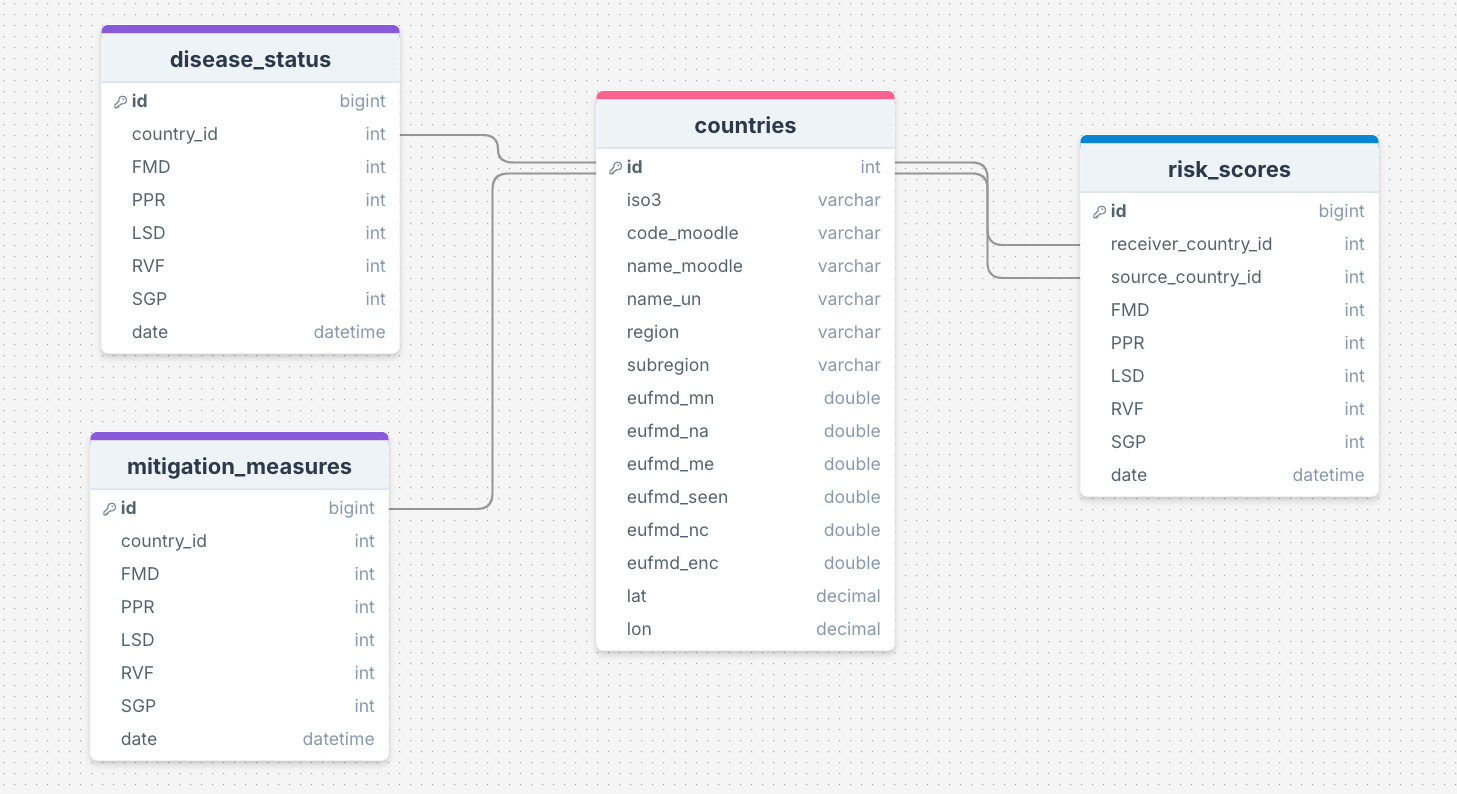
Testing
If you'd like to test routes in Postman, you will first need to "log in". To do this:
POST localhost:5800/api/auth/loginwithreq. bodyin this format (ask the team for the admin login info):
{
    "email": "string",
    "password": "string"
}
- Copy the token
- Open the headers tab and write at the key cell x-access-token and paste the token at the value cell.
- Now you can use other endpoints that require authorisation.
Architecture
RMT shares a codebase with our parent app, DB Manager. Please look there for full documentation on back-end architecture. Within this environment, RMT uses:
/src
├── controllers
├── models
├── routes
├── services
├── middleware
├── utils
├── config
├── tests
└── app.js
Controllers
Logic that handles requests and responses. Each file should focus on a specific resource or functionality.
// controllers/userController.js
const getUser = (req, res) => {
  // Logic to fetch user data
};

module.exports = {
  getUser,
};
Models
Database schemas, models and helpers.
Routes
API endpoints and their associated controller methods.
// routes/userRoutes.js
const express = require("express");
const userController = require("../controllers/userController");

const router = express.Router();

router.get("/users", userController.getUser);

module.exports = router;
Services
Complex business logic that isn’t directly tied to a specific endpoint.
// services/authService.js
const generateToken = (user) => {
  // Logic to generate a JWT token
};

module.exports = {
  generateToken,
};
Middleware
Authentication, validation and error handling.
Utils
Utility functions that can be reused across the application (p.e. formatDate).
Config
Environment variables, database configurations…
Tests
Unit and integration tests.
API
| Description | Endpoint | Method | Params | Body | Return |
|---|---|---|---|---|---|
| check connection | /rmt | GET | - | - | {title: "Connected!"} |
| GET list of all regions | /rmt/regions | GET | - | - | array of strings: ["Region1", ...] |
| GET list of all countries | /rmt/countries | GET | - | - | array of country objects: [{ "id": int, "iso3": string, "name_un": string, "subregion": string}, ...] |
| GET all disease status scores | /rmt/disease-status | GET | - | - | array of disease status objects: [{ "id": int, "country_id": int, "FMD": int, "PPR": int, "LSD": int, "RVF": int, "SGP": int, "date": datetime }, ...] |
| GET disease status scores by country | /rmt/disease-status/:countryId | GET | int countryId | - | country info + disease status scores: { "country": [ { "id": int, "iso3": string, "name_un": string } ], "scores": [ { "id": int, "country_id": int, "FMD": int, "PPR": int, "LSD": int, "RVF": int, "SGP": int, "date": datetime } ]} |
| POST new disease status score | /rmt/disease-status | POST | - | { "country_id": int, , "FMD": int, "PPR": int, "LSD": int, "RVF": int, "SGP": int, "date": string } | updated array of disease status objects: [{ "id": int, "country_id": int, "FMD": int, "PPR": int, "LSD": int, "RVF": int, "SGP": int, "date": datetime }, ...] |
| DELETE disease status by id | /rmt/disease-status/:id | DELETE | int id | - | updated array of disease status objects: [{ "id": int, "country_id": int, "FMD": int, "PPR": int, "LSD": int, "RVF": int, "SGP": int, "date": datetime }, ...] |
| GET all mitigation measures | /rmt/mitigation-measures | GET | - | - | array of mitigation measures: [{ "id": int, "country_id": int, "FMD": int, "PPR": int, "LSD": int, "RVF": int, "SGP": int, "date": datetime }, ...] |
| GET mitigation measures by country | /rmt/mitigation-measures/:countryId | GET | int countryId | - | country info + mitigation measures scores: { "country": [ { "id": int, "iso3": string, "name_un": string } ], "scores": [ { "id": int, "country_id": int, "FMD": int, "PPR": int, "LSD": int, "RVF": int, "SGP": int, "date": datetime } ]} |
| POST new mitigation measures score set | /rmt/mitigation-measures | POST | - | { "country_id": int, , "FMD": int, "PPR": int, "LSD": int, "RVF": int, "SGP": int, "date": string } | updated array of mitigation measures objects: [{ "id": int, "country_id": int, "FMD": int, "PPR": int, "LSD": int, "RVF": int, "SGP": int, "date": datetime }, ...] |
| DELETE mitigation measures record by id | /rmt/mitigation-measures/:id | DELETE | int id | - | updated array of mitigation measures objects: [{ "id": int, "country_id": int, "FMD": int, "PPR": int, "LSD": int, "RVF": int, "SGP": int, "date": datetime }, ...] |
| GET all risk scores for one target country | /rmt/risk-scores/:receiverCountryId | GET | int receiverCountryId | - | object containing data array of risk scores objects: { "data": [ { "id": int, "receiver_country_id": int, "source_country_id": int, "FMD": int, "PPR": int, "LSD": int, "RVF": int, "SGP": int, "date": datetime, "iso3": string, "name_un": string }, ...], "error": null } |
| POST new risk score between two countries | /rmt/risk-scores/:receiverCountryId/:sourceCountryId | POST | int receiverCountryId, int sourceCountryId | {connections}, {diseaseStatus}, {mitigationMeasures}** | - |
** connections object format:
{
    liveAnimalContact: int,
    legalImport: int,
    proximity: int,
    illegalImport: int,
    connection: int,
    livestockDensity: int,}
** diseaseStatus & mitigationMeasures object format:
{
  FMD: int, PPR: int, LSD: int, RVF: int
}
Style guide
Follow EUFMD's Engineering Guidelines. In addition to those, we do the following:
Endpoints
- Simple and self-describing endpoints
- ❌
/api?type=user&id=1234 - ✅
/api/users/1234
- ❌
- Plural Nouns. Never use the CRUD names in URIs.
- ❌
/api/user/1234: singular - ❌
/api/getUsers/1234: verb - ✅
/api/users/1234
- ❌
- Stick to standard HTTP methods
POST / users; // Create a new user
GET / users; // Get all users
GET / users / { id }; // Get a specific user
PUT / users / { id }; // Update a specific user
DELETE / users / { id }; // Delete a specific user
- Use hyphens (-) to improve readability of long names. Important to avoid underscores (_) because they might be completely hidden in some browsers.
- ❌
/api/riskScores/ - ❌
/api/risk_scores/ - ✅
/api/risk-scores/
- ❌
Architecture
Follow the architecture documented above when creating new routes, functions, files etc.